
Your Privacy

This site uses cookies to enhance your browsing experience and deliver personalized content. By continuing to use this site, you consent to our use of cookies.
COOKIE POLICY
Skip to main content

Inside Config 2025: What’s New in Figma

Inside Config 2025: What’s New in Figma
Back to insights

Config 2025 kicked off with a bang on Day 1. Figma’s annual conference brings together designers, developers, and all those involved in the making of a product. The 2-day event has a stacked lineup of accomplished speakers ready to share their insights on the world of product building.  

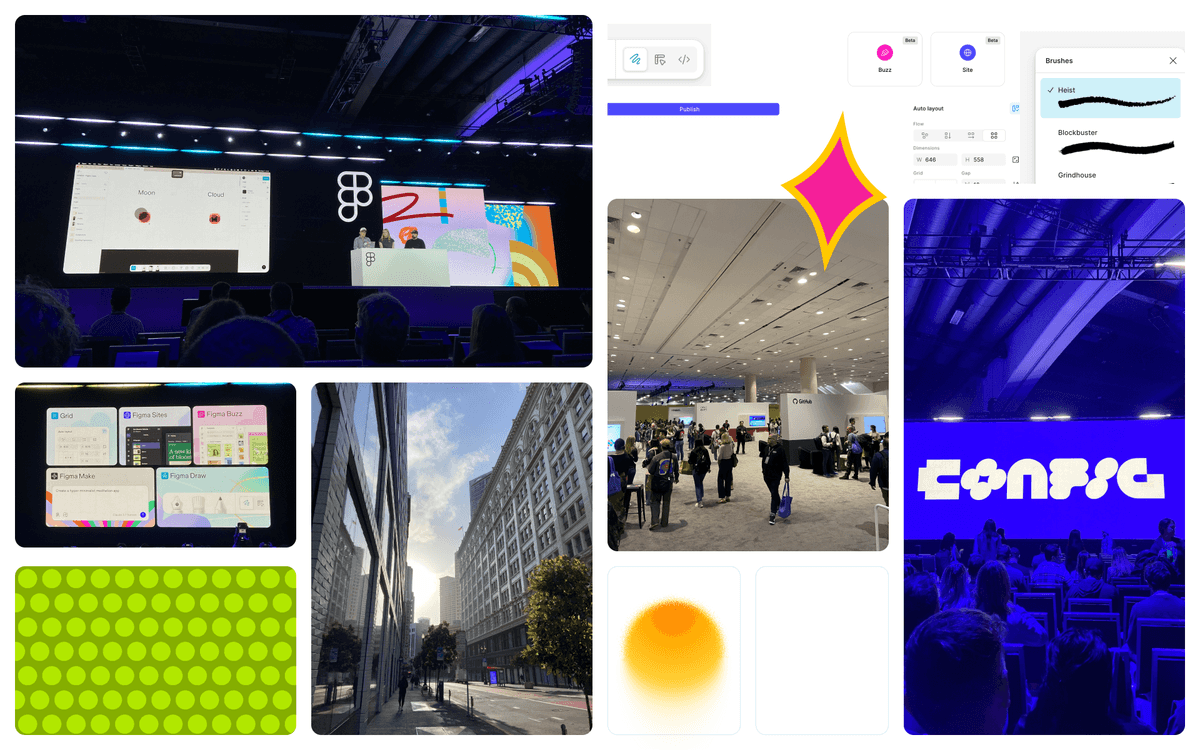
At today’s opening keynote, the Figma team, led by CEO Dylan Field, announced four exciting new products and one new feature for Figma Design: 

  1. Grid: Figma made it known that they pay close attention to their users by implementing a long-awaited grid feature. This advancement of auto-layout will make digital product design even easier by allowing designers to snap objects into a grid with customizable padding, spacing, and sizing. 
  2. Figma Sites: Designers and developers can now publish a web design directly from Figma into a fully working website. Designers can pop their creations right into a Sites file, and developers can access and edit the website’s code. Sites will also allow for product teams to publish their website with a custom domain. 
  3. Figma Draw: For designers who want to breathe a little more life into their work, Figma Draw is going to change the game. Vector editing, custom brush strokes, pattern fills, and textures are just a few of the 22 new features included with Draw that will bring design customization to a whole new level.  
  4. Figma Buzz: Buzz will revolutionize the relationship between product designers and marketers. With simple tools to mass create assets plus seamless integration with Figma’s variables and template features, marketers can promote their products with ease while staying in touch with their design team’s constant updates. 
  5. Figma Make: This final product is still in testing, but I cannot wait to give it a try after hearing about it at Config 2025. Make utilizes AI to make prototypes smarter and more interactive. The demo showcased how users can prompt Make to create specific interactions within an existing design. The product will eventually go even further, allowing for 3D rendering and movement through a design. 

Config

Following the opening keynote, I stuck around for the Figma Draw Deep Dive and got a better look at the breadth of features Draw has to offer. I then moved to the Level 2 stage, where I heard from Cheechee Lin on the power of prototyping to influence decisions, Subham Agarwal on the process and impact of killing a product, and Wojtek Dziedic on how to create an engaging pitch.  

Key Takeaways

1. “Prototyping turns ideas into innovations” – Cheechee Lin 

Prototyping is a key communication tool for designers. By showing stakeholders or team members our ideas in action via prototyping, we can start more productive conversations about what works and what doesn’t. 

2. The RADAR Method – Subham Agarwal 

Before killing a product or feature, Read, Assess, Decide, Act, and Review. Do your homework on what’s going wrong, assess both the customer impact and the business impact, decide to pause, reiterate, or kill the product, communicate the decision to your team and users, and finally review what could be done differently next time around.  

 3. “Ideas don’t matter” – Wojtek Dziedic 

While ideas are obviously the genesis of any product build, they can’t take off without the right pitch. Unless we communicate our ideas clearly and keep our pitches interesting, we’ll lose the faith and attention of our stakeholders, thus leaving our ideas in the dust.  

The closing keynote included talks from Linear’s Karri Saarinen, Meta’s Andrew “Box” Bosworth, and the production designer of Apple TV’s Severance, Jeremy Hindle. Hindle’s talk was a major highlight, as he shared his design process from inspiration to execution. It was fascinating to see how his diverse artistic references translate into his unique point of view as a designer. His attention to detail and fusion of past and present influences motivated me to pay particular attention to the iteration phase of design and look for inspiration in unexpected places.  

After an eventful first day at Config 2025 full of incredible speakers and warm introductions to people shaping the product design space, I’m looking forward to seeing what Day 2 has to offer. 


Digging In

  • Design

    A Day in the Life of Nadean Ali, UX Design Consultant

    Ever wondered what a day in the life of one of our consultants looks like? This series dives into the details! Today, we’re spotlighting Nadean Ali, a UX Design Consultant based in Atlanta. Here’s a glimpse into her typical day. Morning I’m an early bird, so I usually start my day with a warm cup of tea, […]

  • Design

    Visual QA Checker Prototype

    Automates visual QA by checking builds against design specs and rules, flagging inconsistencies early so teams deliver higher-quality products, faster handoffs, and smoother launches.

  • Design

    What to Ask in a UX Discovery Session

    Better questions lead to better design. In my years as a UI/UX designer, I’ve learned that many design challenges may come from misalignment at the start. Discovery sessions are where product clarity is either made or missed. These are a few discovery questions I consistently return to in the discovery phase of my UX design […]

  • Design

    Designing For Play and Friction in a Fast-Paced World

    At UDig, play is an integral part of our philosophy. “Having fun” is embedded in our culture, and we always find opportunities to use play to encourage collaboration, ignite creativity, and make room for bold experimentation to build stronger teams and solve problems ranging from the seemingly simple to the most complex. I always have […]

  • Design

    Config 2025 Day Two Recap

    It felt as though Config 2025 ended as soon as it began, and I believe those of us that attended are all the better for it. By the end of the day, various inspirational and informative talks had been given by thought leaders and innovators in the product space. Between sessions, we had the opportunity […]

  • Design

    Increasing Digital Buyers and Boosting Growth through a Creative Product Strategy

    A digital product concept that focuses on connecting buyers who do not interact with HPX on other channels. UDig took an understanding of their business strategy, analyzed their digital offerings, and delivered a creative product strategy to focus their digital efforts.